If you would like to authenticate by identity document, please proceed as steps in pages 1-2.
If you would like to authenticate by File-based Digital Certificate, please proceed as steps in pages 1-3.
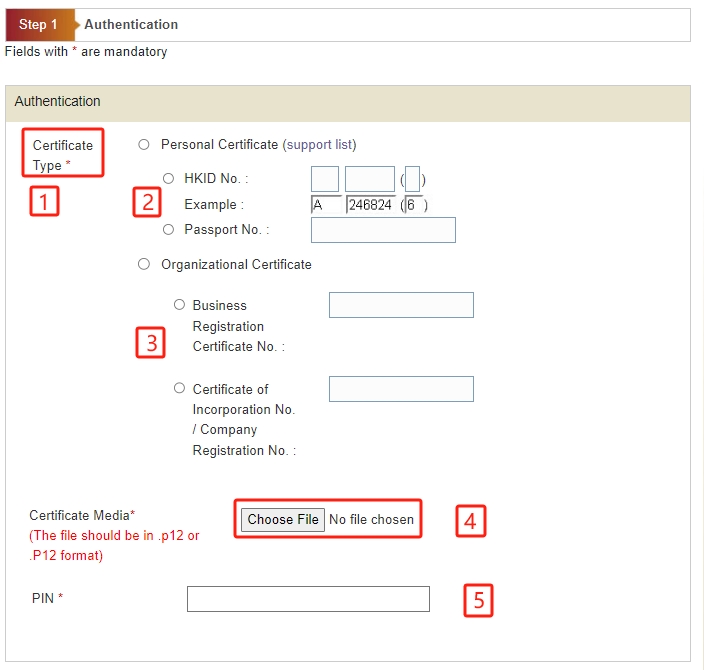
Step 1 - Authenticate by File-based Digital Certificate
Please provide the Application Particulars
1. Select your Certificate Type.
2. If you select Personal Certificate, enter HKID No. or Passport No.
3. If you select Organizational Certificate, enter Certificate of Incorporation/Registration No.
4. Select Certification Media.
5. Enter the PIN of the digital certificate.
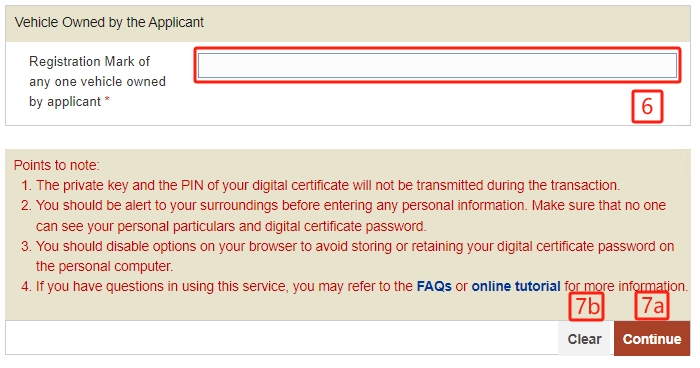
6. Enter Registration Mark of any one vehicle owned by applicant.
-
Press "Continue" button to go to next screen. or
Press "Clear" button to clear and re-enter the data.