Step 3: Submit Your Application
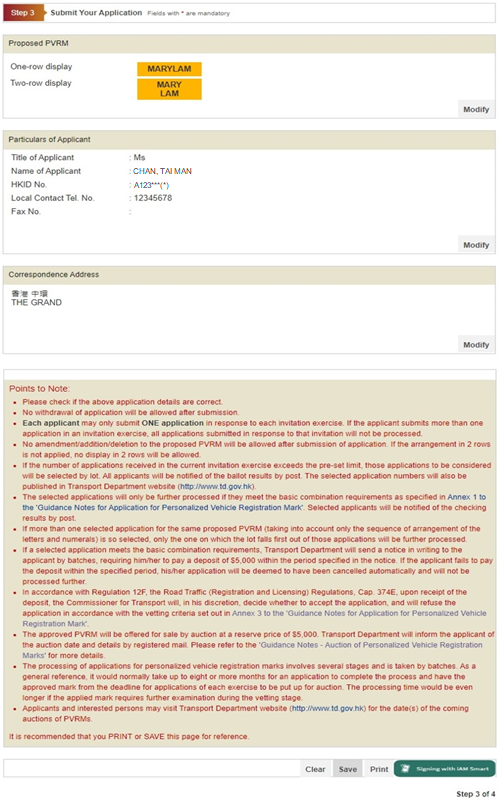
Please check if the application details provided are correct. If you find that any information is incorrect, you can press <Modify> button to amend the details. If the application details are correct, please input your PIN and click <Sign and Submit> button to sign and submit the application. You are recommended to print or save this page for future reference before going to the next step.
On the right bottom of the screen, you can:
-
Press <Clear> button to clear and re-enter the data; or
Press <Save> button to save this page; or
Press <Print> button to print this page; or
Press <Sign and Submit> button to go to the next step.
1. Web page shows instruction to sign your application with “iAM Smart”.
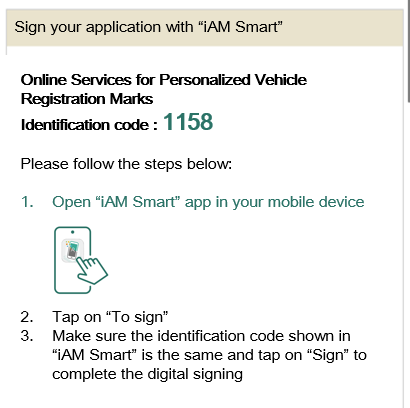
2. Open “iAM Smart” app in your mobile device.
3. Tap on “To sign”.
4. Make sure the “Identification code” shown in “iAM Smart” is the same as shown in web page and tap on “Sign” to complete the digital signing.